
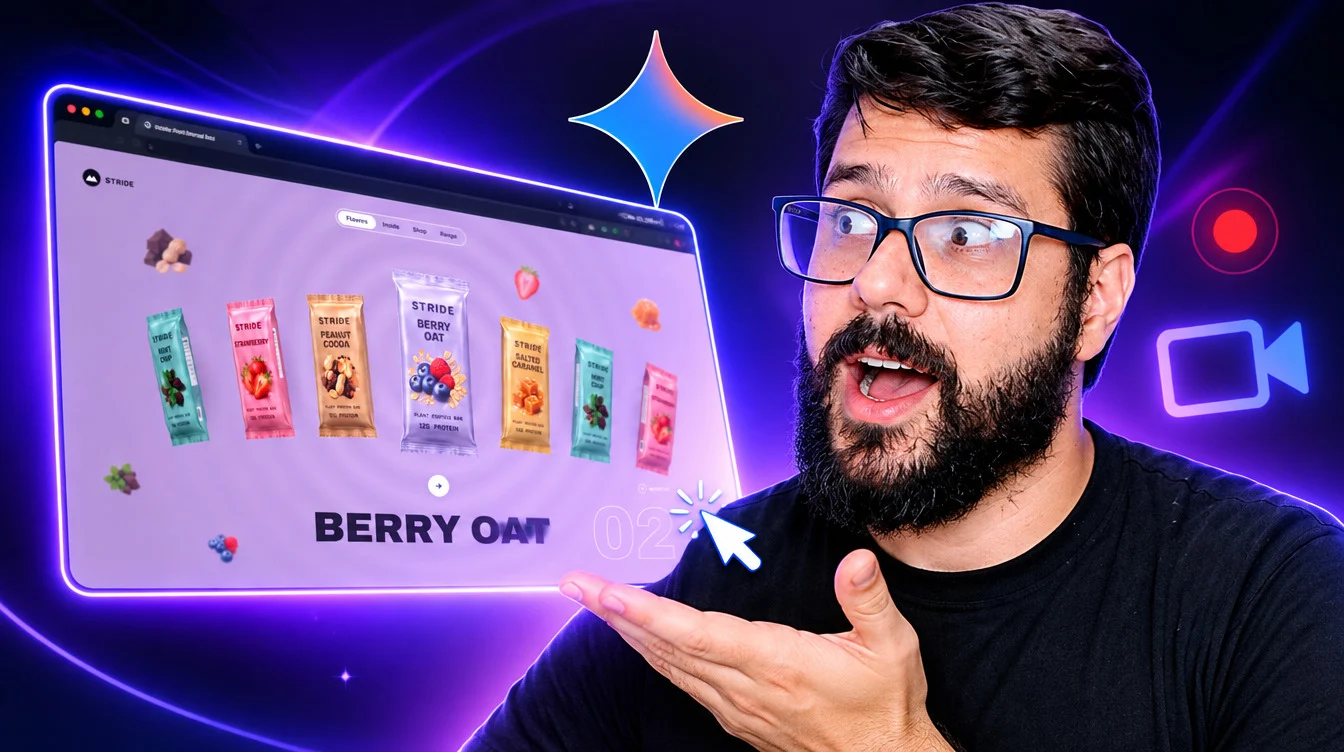
O mercado de inteligência artificial acaba de dar mais um salto gigantesco. O Google anunciou oficialmente o Gemini 4 Neon, o novo modelo de fronteira projetado para entregar raciocínio profundo, velocidade impressionante e código pronto para produção [1.1.1].
Se você estava procurando pelo “novo Gemini 4 Pro”, vale um esclarecimento rápido logo de cara: o Gemini 4 Neon chegou justamente para ocupar esse espaço, substituindo o Argon e o antigo modelo Pro dentro do aplicativo Gemini para assinantes do plano Google AI Pro [1.1.2].
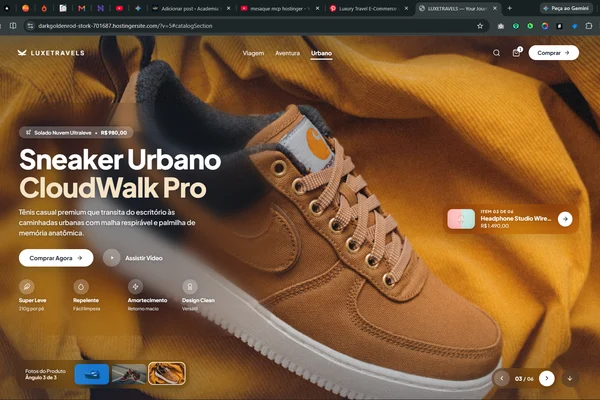
Mais do que teoria e gráficos bonitos, eu coloquei esse modelo à prova na prática. Usando o Google AI Studio, criei um site animado de altíssimo padrão visual em HTML e CSS do zero e fiz o deploy completo na Hostinger em pouquíssimos cliques.
Neste guia completo, você vai entender exatamente como o Gemini 4 Neon funciona, conferir os números oficiais de benchmarks, ver onde ele se encaixa na família Gemini 4 e aprender o fluxo exato de Vibe Coding para tirar o seu próprio site do papel hoje mesmo.
O que é o Gemini 4 Neon e por que ele chama tanta atenção?
Anunciado pelo Google DeepMind em 19 de novembro de 2026, o Gemini 4 Neon foi construído para resolver o maior dilema de quem trabalha com IA no dia a dia: escolher entre inteligência máxima (modelos lentos e caros) ou velocidade (modelos rápidos, porém rasos) [1.1.1, 1.1.5].
O Neon nasce exatamente no ponto de equilíbrio ideal. Ele entrega inteligência de ponta com execução rápida e completa de tarefas complexas em engenharia de software, análise de dados, trabalho corporativo e ciência [1.1.1].
Entre os principais pilares técnicos do modelo, destacam-se:
- Janela de contexto de 1 milhão de tokens: O modelo lê e sintetiza simultaneamente grandes bases de código, planilhas, PDFs, gráficos, áudios e vídeos em uma única sessão [1.1.4].
- Quatro níveis de raciocínio ajustáveis: Você pode calibrar o esforço de pensamento do modelo — do nível Baixo (Low) para edições rápidas até o Extra Alto (xhigh) para problemas complexos de várias etapas [1.1.5].
- Menor taxa de alucinação (fabricação): Nos testes internos do Google Antigravity, o Neon registrou a menor taxa de fabricação de dados já vista em um modelo da linha, seguindo instruções de múltiplas etapas com rigor extremo [1.1.5].
- Direcionamento preciso: Se você corrige o modelo no meio de uma tarefa, ele se adapta imediatamente sem perder o fio da meada — característica essencial para quem cria sites e sistemas via Vibe Coding.
Onde o Gemini 4 Neon se encaixa na família Gemini 4?
Para não confundir os nomes da nova geração de IAs do Google, vale olhar como cada modelo da família Gemini 4 foi posicionado [1.1.2]. Cada um tem uma missão clara:
| Modelo | Foco Principal | Quando Usar | Disponibilidade Principal |
| Gemini 4 Hydrogen | Velocidade máxima e baixo custo | Tarefas cotidianas, textos rápidos, pesquisas simples e execução ágil em escala [1.1.2]. | Plano gratuito (seleção automática), AI Plus e API [1.1.2]. |
| Gemini 4 Neon | Equilíbrio entre profundidade e eficiência | Programação, criação de sites, análise de documentos, automações e fluxos de alta frequência [1.1.1, 1.1.2]. | Google AI Pro, Ultra, Google AI Studio, API e Antigravity [1.1.1, 1.1.2]. |
| Gemini 4 Argon | Raciocínio avançado (geração anterior) | Programação, matemática e problemas científicos (substituído pelo Neon no app) [1.1.2]. | Mantido para desenvolvedores via API Gemini [1.1.2]. |
| Gemini 4 Carbon | Máxima profundidade e longo prazo | Projetos extremamente complexos, pesquisas científicas extensas e sistemas robustos [1.1.2]. | Plano Google AI Ultra e API [1.1.2]. |
Enquanto o Carbon atua como o “pesquisador sênior” para projetos de altíssima complexidade e o Hydrogen funciona como o “assistente ultrarrápido” do dia a dia, o Neon é o motor principal de produção [1.1.1].
Inclusive, em ambientes como o Google Antigravity, já é possível combinar o Neon como planejador/arquiteto junto com o Hydrogen executando tarefas rotineiras em paralelo via Orchestrator [1.1.5].
Benchmarks oficiais: o desempenho do Gemini 4 Neon na prática
Os números divulgados no blog oficial do Google mostram que o Gemini 4 Neon não veio apenas para “fazer bonito”, mas para liderar testes independentes de código, automação e custo-benefício [1.1.1, 1.1.5].
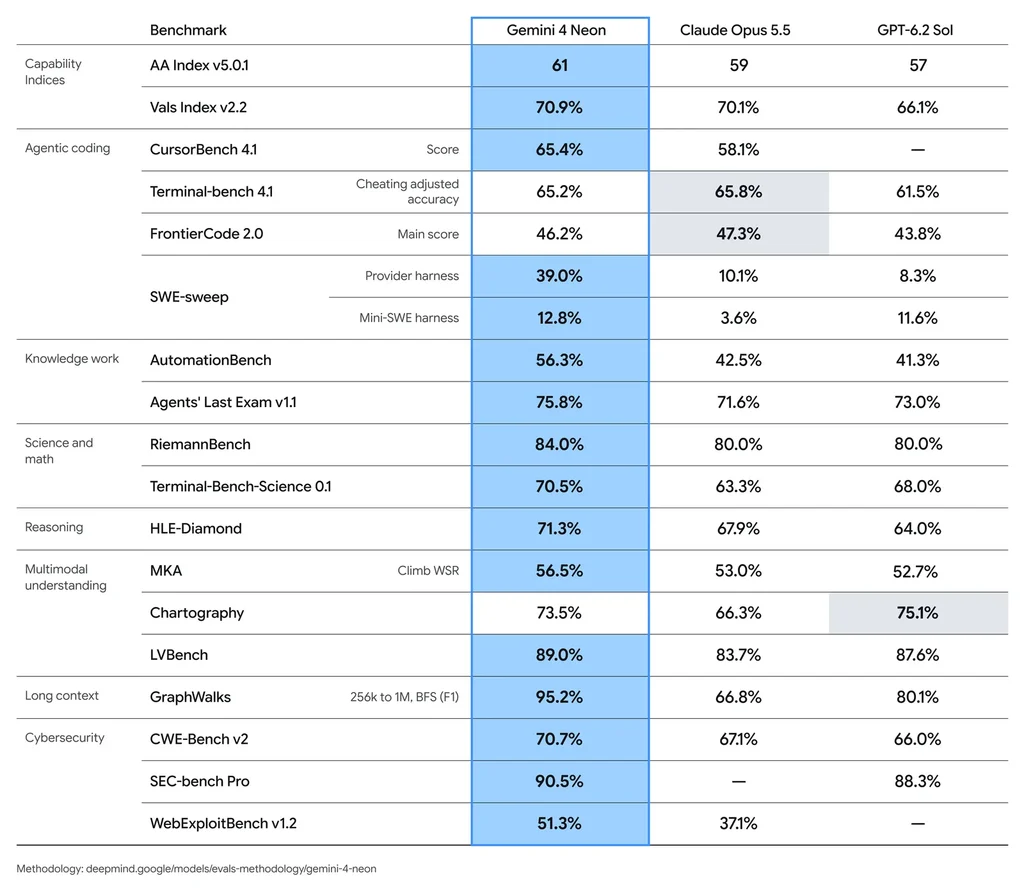
Confira os destaques dos principais benchmarks:
| Benchmark / Avaliação | Resultado do Gemini 4 Neon | O que isso significa na prática |
| Artificial Analysis Coding Agent Index | 1º lugar geral (58,6) [1.1.5] | Liderança absoluta em tarefas reais de agentes de programação. |
| Zapier AutomationBench | 1º lugar geral (56,3%) [1.1.5] | Excelência na criação e execução de fluxos de trabalho automatizados. |
| Artificial Analysis Intelligence Index | 3º lugar geral (61 pts em xhigh) [1.1.5] | Desempenho de fronteira custando mais de 36% menos por tarefa que concorrentes no nível máximo [1.1.1]. |
| Vals Index | 2º lugar geral (70,9%) | Na fronteira de Pareto em eficiência, liderando áreas técnicas como Legal Research e Tax Agent. |
| Agent Arena Index | 2º lugar global (1.336 pts) | Avaliado em mais de 4.200 sessões reais; destaque em se adaptar às correções do usuário. |
| Terminal-Bench 4.1 / Science | 65,2% / 70,5% | Alta capacidade de operar ferramentas, terminal e raciocínio científico. |
| SWE-sweep (no Antigravity) | 39,0% | Refatoração e correção de código em múltiplos arquivos e repositórios com precisão. |
Preço da API e custo-benefício
Para quem desenvolve aplicações ou usa o modelo via API no Google AI Studio, o custo do Gemini 4 Neon é um dos grandes atrativos:
- Tokens de entrada: US$ 3 por milhão de tokens.
- Tokens de entrada em cache: US$ 0,15 por milhão de tokens (desconto de 95%).
- Tokens de saída: US$ 15 por milhão de tokens.
Na prática, no seu nível de raciocínio padrão (Alto), o Neon entrega uma pontuação altíssima custando 32% menos por tarefa do que o Gemini 4 Carbon [1.1.5] — e entre 50% e 80% menos que os principais concorrentes de fronteira em índices independentes.
Segurança, confiabilidade e cibersegurança de ponta
Um problema clássico de modelos de IA que geram código é produzir scripts vulneráveis ou “tomar atalhos” para fingir que a tarefa terminou. O Google atacou esse ponto diretamente no Gemini 4 Neon.
Nos testes de cibersegurança, o modelo alcançou 76% no nível difícil do AutoBaxBench (geração de código seguro desde o início), 90,5% na detecção de vulnerabilidades (SEC-bench Pro) e 70,7% na correção da causa raiz de falhas (CWE v2 da Collinear) [1.1.1].
Além disso, o modelo apresentou 0,0% de taxa de sucesso para ataques de injeção indireta de prompt no benchmark da Gray Swan (com proteções máximas ativadas) [1.1.1] e 99,2% de aprovação na avaliação de honestidade de agentes. Para quem coloca código gerado por IA em produção, essa confiabilidade muda o jogo.
Na prática: como criei um site animado no Google AI Studio com Vibe Coding
Chega de falar só de especificações — vamos ao que realmente interessa para quem cria sites e projetos digitais.
O conceito de Vibe Coding consiste em guiar a inteligência artificial com instruções claras de design, arquitetura e experiência do usuário, deixando que o modelo escreva o código limpo (HTML, CSS e JavaScript) enquanto você atua como o diretor criativo do projeto.
No meu teste ao vivo, utilizei o Google AI Studio com o Gemini 4 Neon selecionado para construir um site animado completo, moderno e responsivo, sem depender de frameworks pesados ou instalações demoradas.
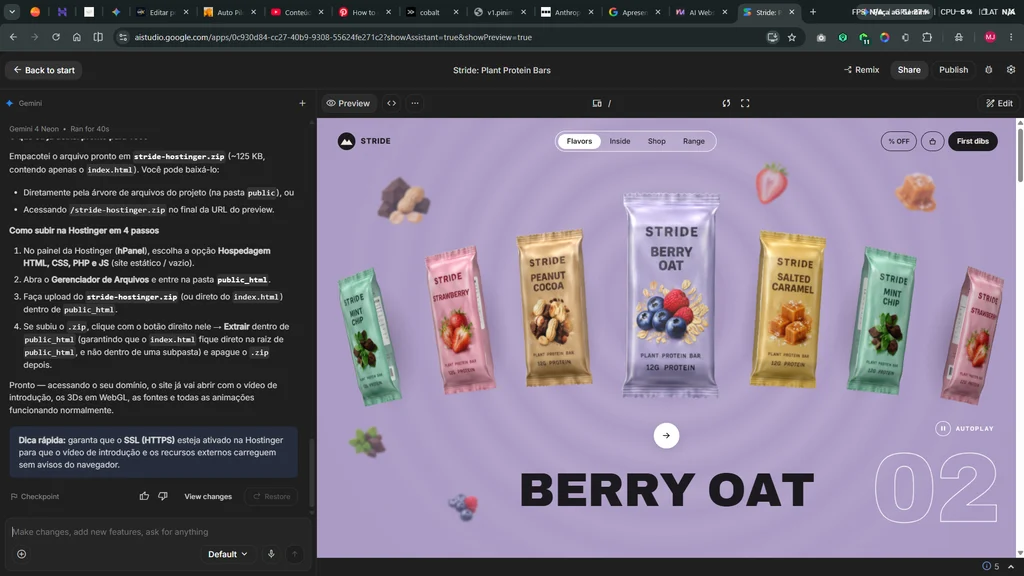
O passo a passo dentro do Google AI Studio
- Acesse o Google AI Studio: Faça login com sua conta Google e selecione o modelo Gemini 4 Neon no painel lateral [1.1.1].
- Ajuste o nível de raciocínio: Para criação de interfaces ricas com animações suaves, deixar o raciocínio no nível Alto garante que a IA pense na hierarquia visual, na responsividade e nas microinterações antes de cuspir o código [1.1.5].
- Envie um prompt estruturado: A qualidade do site depende diretamente da clareza do seu briefing.
- Revise e baixe os arquivos: Assim que o Neon entregar a estrutura em HTML e CSS (e JS para as animações), teste o preview, peça ajustes pontuais se necessário e salve os arquivos compactados em um arquivo
.zip.
O Prompt Especial utilizado no projeto
Para replicar o nível visual que você viu no vídeo, utilize o prompt abaixo como base e adapte o nicho, as cores e os textos para o seu projeto:
# Stride — plant protein bar site with one travelling 3D bar

Build a single-file, four-section landing page for a fictional plant protein bar brand called **Stride**. The page sells five bar flavours. Its centrepiece is a real-time 3D bar wrapper (Three.js / WebGL). Every bar on the hero arc is 3D. The bar you pick in the hero then travels down the page as one object:
- It flies into a pinned "what's inside" section and flips 180° at every step.
- It spins through a storm of its own ingredients.
- It lands exactly on its own card in the shop grid.

The background of the hero and section 2 always takes the active flavour's colour. When the flavour changes, the new colour grows out as a circle from behind the centre bar.

Recreate the page exactly as described below: every element, value, asset URL, font, animation and interaction.

---

## 1. Assets

Every image and video is a direct Higgsfield result link. Images go through the images.higgs.ai resizer. Do not re-host, crop or slice any asset into separate files. Small items are shown as CSS `background-position` crops of one sheet, and as WebGL texture crops of that same sheet.

| Asset | URL | How it is used |
|---|---|---|
| Wrapper + ingredient sheet (transparent PNG, 2688 × 1520 source px) | `https://images.higgs.ai/?default=1&output=webp&url=https%3A%2F%2Fd8j0ntlcm91z4.cloudfront.net%2Fuser_38xzZboKViGWJOttwIXH07lWA1P%2Fhf_20261116_132032_30242d8c-5062-4d60-8a3d-238f0a2ff788.png&w=2200&q=85` (raw result: `https://d8j0ntlcm91z4.cloudfront.net/user_38xzZboKViGWJOttwIXH07lWA1P/hf_20261116_132032_30242d8c-5062-4d60-8a3d-238f0a2ff788.png`) | Set as the CSS custom property `--sheet` on `:root` (`url("…")`). Every `.spr` element uses it as `background-image`. The same URL is loaded once more as an `Image` with `crossOrigin="anonymous"` to build the WebGL textures (the server sends `Access-Control-Allow-Origin: *`). |
| Intro clip (Kling 3.0, MP4, 1280 px wide) | `https://d8j0ntlcm91z4.cloudfront.net/user_38xzZboKViGWJOttwIXH07lWA1P/hf_20261116_131908_b6239896-c077-450c-ad91-575153973fcf.mp4` | Full-screen intro video. Bar chunks, oats and berries burst toward the camera on a lilac background. |
| Three.js 0.160.0 | `https://cdn.jsdelivr.net/npm/[email protected]/build/three.module.min.js` | Loaded through an import map as `three`. |
| RoomEnvironment | `https://cdn.jsdelivr.net/npm/[email protected]/examples/jsm/environments/RoomEnvironment.js` | Import map prefix `three/addons/` → `https://cdn.jsdelivr.net/npm/[email protected]/examples/jsm/`. Used for soft reflections on the foil. |

### Crop boxes on the sheet (source pixels, `[x, y, w, h]`)

All five wrappers sit upright in one row. Each one has crimped seals at the top and bottom (about 6% of its height each). The wrapper colour matches its flavour. The art reads STRIDE / flavour name / ingredient photo / "PLANT PROTEIN BAR" / "12G PROTEIN".

| # | Flavour | Wrapper box | Flavour colour | Ingredient bit used |
|---|---|---|---|---|
| 0 | Peanut Cocoa | 98, 145, 403, 849 | `#b79474` | bit 1 |
| 1 | Berry Oat | 620, 145, 402, 849 | `#ab9ac4` | bit 0 |
| 2 | Salted Caramel | 1137, 145, 402, 849 | `#d1ad6c` | bit 2 |
| 3 | Mint Chip | 1661, 145, 402, 849 | `#94bdb4` | bit 3 |
| 4 | Strawberry | 2184, 145, 403, 849 | `#d396a7` | bit 4 |

The ingredient bits sit in a second row below the wrappers:

| Bit | Box | Content |
|---|---|---|
| 0 | 650, 1090, 340, 305 | blueberries and raspberry |
| 1 | 110, 1125, 280, 255 | chocolate chunks and peanuts |
| 2 | 1175, 1110, 320, 285 | salted caramel cube |
| 3 | 1680, 1085, 380, 305 | mint leaves and dark chocolate |
| 4 | 2280, 1095, 250, 295 | half strawberry |

**CSS sprite crop.** For a box `(x, y, w, h)` with optional padding `pad`, first enlarge it: x − pad, y − pad, w + 2·pad, h + 2·pad. Then set:
- `background-size`: `SW/w × 100%` horizontally and `SH/h × 100%` vertically, where SW = 2688 and SH = 1520.
- `background-position`: `x/(SW − w) × 100%` horizontally and `y/(SH − h) × 100%` vertically.

Wrappers always use pad = 4. Bits use pad = 0.

## 2. Fonts

Self-host the latin WOFF2 files. In the standalone file they are base64 data URIs.

| Family | Weights | Source | Role |
|---|---|---|---|
| Archivo Black | 400 | Google Fonts | Display caps: hero title, section headlines, outline numbers, card names, builder headline. Class `.disp`: uppercase, letter-spacing −0.01em, line-height 0.92. |
| Inter (variable) | 100–900 | Google Fonts | UI text: nav, brand wordmark (800, tracking 0.06em), buttons. |
| DM Mono | 400, 500 | Google Fonts | Captions, the "Autoplay" label, the Skip pill, the shop caption, the builder price and the count markers. |

All four use `font-display: swap`. Before the bar backs are drawn on canvas, the code awaits `document.fonts.load` for Archivo Black 400, DM Mono 400 and 500, and Inter 700.

The reel's display face is a rounded heavy sans that couldn't be identified. Archivo Black is the closest free match.

## 3. Head, tokens and scaling

- **Head:** title "Stride: Plant Protein Bars"; meta description "Five bold flavours of plant protein bar. Pressed, not baked."; viewport `width=device-width, initial-scale=1, viewport-fit=cover`.
- **Colour tokens:**
  - `--ink` `#1c1a1f` (text)
  - `--cream` `#f0e8e0` (page and shop background)
  - `--dark` `#191a1e` (builder background)
  - `--flav` (the live flavour colour, default `#ab9ac4`)
- **Ease token:** `--ease: cubic-bezier(.22,.8,.24,1)`.
- **Scaling:**
  - Hero unit: `--u = min(100vw/1440, 100vh/900)`. The hero is laid out on a 1440 × 900 frame centred in the viewport.
  - Scrolling sections use a width unit: `--w = 100vw/1440`.
  - Nav unit: `--n = min(100vw/1440, 1px)`.
  - Section 2 uses a fixed 1440 × 900 frame (390 × 780 on phones), scaled with `transform: translate(-50%,-50%) scale(k)` from the centre of the viewport. Desktop k = min(vw/1440, vh/900); phone k = min(vw/390, vh/780).
  - Below 820 px wide, a separate phone layout applies.
- **Body:** `overflow-x: hidden`. While the intro plays, the body has class `locked`, which sets `overflow: hidden`.

## 4. Layering (important)

There is one `<canvas id="gl">`, the first element in `<body>`:
- Styles: `position: fixed; inset 0; width 100vw; height = innerHeight px; z-index: 2; pointer-events: none`.
- Every 3D bar on the page is drawn into it.
- Section backgrounds are not positioned with a z-index, so they paint underneath the canvas.

What sits above the canvas:
- hero title (z 60), next button (z 60), Autoplay button (z 60)
- nav (z 50)
- intro (z 100)
- section 2's front layer: a separate `position: fixed` element at z-index 3, described in §8

What sits under the canvas:
- hero counter (z 1), rings, floating bits
- section 2's big outline number
- everything in the shop and the builder

The hero must not use `isolation` or create any other stacking context, or the title would fall under the canvas.

## 5. The 3D bar

### Geometry: one shared shape for every flavour

The wrapper is 1 unit wide and BH = (849 + 8)/(403 + 8) ≈ 2.085 units tall (the aspect of the padded art crop). It is made of two surfaces, a front and a back. Each is a `PlaneGeometry(1, BH, 30, 64)`, with every vertex pushed out along z.

For a vertex with plane UV (u, v):
- ex = |2u − 1| (0 at the centre line, 1 at the side edges)
- ev = min(v, 1 − v) (0 at the top and bottom ends)
- crimp band CR = 0.062

How far each vertex is pushed out:
- **Inside the crimp band (ev < CR):** a flat seal with vertical crimp teeth. z = 0.006 + 0.006·|sin(u·π·34)|.
- **Everywhere else:** a puffed pillow.
  - across = (max(0, 1 − ex^2.6))^0.62
  - along = (clamp((ev − CR)/0.11, 0, 1))^0.7
  - z = 0.012 + 0.118·across·along + 0.004·sin(23u + 31v)·across (the last term is a faint crinkle)

The front surface uses +z. The back surface uses −z, with u mirrored in its UVs (u → 1 − u) and every triangle's winding reversed so it faces outward. Recompute the normals for both.

The two surfaces meet at the side edges and the seals, so the wrapper is closed. One geometry pair is shared by every bar.

### Textures, per flavour

**Front:** the wrapper's padded crop from the sheet, drawn into a canvas.
- Canvas width = round((w + 8)·1.5·0.75); height = width·BH.
- Source rect = box ± 4 px, multiplied by `naturalWidth/2688`, because the resizer serves a 2200 px wide image.

**Back:** drawn in code inside the same silhouette.
1. Draw the crop mirrored horizontally. This gives the alpha outline and the crimp shading.
2. With `source-atop`, fill the body between the seal bands with the flavour colour at 0.9 alpha. Fill both seal bands (each 7.5% of the height) at 0.35 alpha, so the crimp texture still shows.
3. Lay a horizontal sheen gradient over the body:

   | Position | Colour |
   |---|---|
   | 0 | rgba(0,0,0,.10) |
   | 0.28 | rgba(255,255,255,.14) |
   | 0.5 | transparent |
   | 0.8 | rgba(0,0,0,.04) |
   | 1 | rgba(0,0,0,.14) |

4. Draw the text and panels. W and H are the canvas width and height. Ink = the flavour colour mixed 78% toward `#1c1a1f`.
   - "STRIDE" in Archivo Black at 0.085W, centred at 15% height.
   - "<FLAVOUR> · 50 G" in DM Mono 500 at 0.042W, at 18.5% height.
   - A nutrition panel: a white rounded rectangle at 92% opacity, from x 15% to 85% and y 21.5% to 57.5% (radius 0.03W).
     - "NUTRITION" in Archivo Black at 0.058W.
     - "Serving size 1 bar (50 g)" in DM Mono 0.032W.
     - A solid rule.
     - Seven rows, label on the left and value on the right, with a hairline under each: Calories 210 / Protein 12 g / Total fat 9 g / Carbohydrate 22 g / Fibre 6 g / Sugars 8 g / Salt 0.2 g. The first two rows are DM Mono 500; the rest are 400. Rows are 3.4% of the height apart.
   - "INGREDIENTS" in DM Mono 500 at 62% height. Below it, the flavour's ingredient list wrapped to 70% width, in DM Mono 0.034W with 2.2% line spacing:
     - Peanut Cocoa: "Peanuts, oats, dates, cocoa, pea protein, sea salt."
     - Berry Oat: "Oats, blueberries, raspberries, dates, pea protein, almonds."
     - Salted Caramel: "Dates, cashews, oats, pea protein, sea salt, vanilla."
     - Mint Chip: "Oats, dark chocolate, almonds, pea protein, peppermint oil."
     - Strawberry: "Oats, strawberries, dates, cashews, pea protein, lemon."
   - A barcode on a white rounded card at 73.5% height: bars of seeded random widths, with a small number line under them.
   - "PRESSED, NOT BAKED" in DM Mono 500 at 88.5% height.

Both textures use `CanvasTexture`, `colorSpace = SRGB`, `anisotropy = 8`.

### Materials, lighting and camera

**Material:** each bar has its own `MeshPhysicalMaterial` for the front and for the back, so each bar can fade on its own:
- `map` = the flavour texture; changing flavour only swaps the map
- `transparent: true`, `alphaTest: 0.5`, so the silhouette follows the art
- `roughness 0.45`, `metalness 0`, `clearcoat 0.5`, `clearcoatRoughness 0.32`, `envMapIntensity 0.42`

**Lighting:**
- Environment: `PMREMGenerator.fromScene(new RoomEnvironment(), 0.04)`
- Ambient light: white, 0.55
- Directional key light: white, 1.1, from (−0.6, 0.9, 1.4)
- Renderer: `antialias`, `alpha`, sRGB output, no tone mapping
- Pixel ratio: min(devicePixelRatio, 2), or 1.75 below 820 px wide

**Shadow:** each bar has a soft contact shadow behind it. It is a separate plane, 1.25 × 1.04·BH units, using a radial-gradient canvas texture (rgba(30,18,40,.55) fading to transparent), with `depthWrite: false` and `renderOrder −1`:
- Position: 5% of the bar's height lower than the bar, and 0.32·height behind it.
- Same z-rotation as the bar.
- Width scaled by max(0.3, |cos(ry)|), so it narrows when the bar turns edge-on.
- Opacity 0.5·opacity·shadow factor.

**Camera:**
- D = clamp(1500·min(vw/1440, vh/900), 1000, 2200)
- `PerspectiveCamera` at (0, 0, D), fov = 2·atan((vh/2)/D) in degrees, near 10, far 4D

At this fov, one world unit equals one CSS pixel at z = 0.

**Placing a bar from a screen-space state** `{x, y, h, rz, ry, rx, z, op, sx, sy, shadow}` (x, y = the centre in viewport px; h = the height in px; angles in CSS degrees):
- group position = (x − vw/2, vh/2 − y, z)
- scale = h/BH, multiplied by sx on x and by sy on y
- rotation order `ZYX` (so the CSS `rotateZ(rz) rotateY(ry)` order holds), with rotation = (rx·π/180, ry·π/180, −rz·π/180)
- the bar is hidden when op ≤ 0.01

## 6. Section 1 — Hero carousel (`#flavors`)

- **Size and background:** height 100svh (minimum 300 px), `overflow: hidden`, background `var(--flav)`.
- **Children, in order:**
  1. `.reveal`: absolute, inset 0, background `var(--rv)`, `clip-path: circle(0 at 50% 50%)`. This is the colour-change layer.
  2. `.rings`: centred at 50% / 41%, 2200u square, `repeating-radial-gradient(circle, rgba(255,255,255,.13) 0, rgba(255,255,255,.02) 40u, rgba(255,255,255,.13) 80u)`, masked by `radial-gradient(circle, #000 0 22%, rgba(0,0,0,.55) 34%, transparent 52%)`.
  3. `.bits`: five floating ingredient sprites.
  4. `.arc`: a transparent hit area for touch swipes (`touch-action: pan-y`).
  5. The next (→) button, the title (h1), the counter and the Autoplay button.

### Arc layout (3D bars drawn on the canvas)

The arc centre is (cx, cy):
- cx = vw/2
- desktop: cy = heroHeight/2 − 78u
- phone (<820 px): cy = 40% of the hero height, with u = min(vw/560, heroHeight/980) and an extra x spread of 1.02

The slots are defined by the offset k from the centre:

| \|k\| | dx (u) | dy (u) | height (u) | rz (°) | ry (°) |
|---|---|---|---|---|---|
| 0 | 0 | 0 | 430 | 0 | 0 |
| 1 | 245 | 24 | 330 | 4 | 16 |
| 2 | 452 | 44 | 312 | 8 | 26 |
| 3 | 660 | 80 | 296 | 12 | 34 |
| 4 | 860 | 118 | 280 | 15 | 40 |

- **Between slots:** interpolate linearly for fractional k. dx, rz and ry take the sign of k; |k| is capped at 4.
- **Depth:** z = −|k|·34u.
- **Fade:** opacity is 1 up to |k| = 3.3, then fades to 0 by |k| = 3.9.

**Bar index:** a float `pos` (the bar index at the centre) is tweened. An integer `target` is the selected bar. The bar at index j has flavour j mod 5 and offset k = j − pos. A pool of 11 bars covers j = floor(pos) − 5 … floor(pos) + 5. The selected bar jT = round(target) is not drawn from the pool; it is the **traveller** (§10).

**Idle float**, per bar: b = sin(now/4600·2π + 1.37j). y −= (0.5b + 0.5)·9u, and rz += 0.4b.

### Hero text and controls

- **Title** (`#title`, h1, Archivo Black):
  - Centred, top = 50% + 265u, 96u, ink colour, `aria-live="polite"`.
  - On desktop the size is min(96u, 760u·100/w), where w is the name's width in Archivo Black at 100px (measured on a canvas). Long names such as "SALTED CARAMEL" shrink so they never run into the counter. The size is set when the swap starts, on resize, and once the font has loaded.
  - Each word is a no-wrap inline-block of per-letter spans, so a narrow screen breaks between words, never inside one.
- **Counter** (`#count`):
  - Archivo Black, 200u, transparent fill with a 1.5px rgba(255,255,255,.9) text stroke.
  - Top 50% + 215u, right edge 28u inside the 1440 frame, z 1 (under the bars).
  - Shows the flavour number "01"–"05". Every wrapper prints 12G protein, so the number shows the flavour, not grams.
- **Next button** (`#play`, aria-label "Next flavour"):
  - White circle, 52u, centred at 50% / 50% + 200u, shadow 0 6px 20px rgba(40,28,60,.12).
  - Contains an 18u ink right arrow: a shaft and a chevron head, 1.9 stroke, round caps.
  - Hover: scale 1.08 and the arrow nudges 2px right. Active: scale 0.94. Click advances one bar.
- **Autoplay toggle** (`#auto`, advances every 3200 ms of no interaction):
  - Position: right 40u inside the frame, top 50% + 170u.
  - A 26 px ring (1.3px white border) holding a pause glyph (two rounded bars) or a play glyph, followed by "AUTOPLAY" in DM Mono 500, 11px, tracking 0.14em, white.
  - `aria-pressed` reflects the state. On by default (off under reduced motion).
  - When on, it advances one bar every 3200 ms of no interaction, only while the hero is at least 60% in view and the tab is visible.
- **Floating bits** (sprites, blurred 1.5px):

  | Position (x / y of the hero) | Base size (u) | Rotation | Bit |
  |---|---|---|---|
  | .12 / .20 | 120 | −18° | 0 |
  | .86 / .18 | 96 | 22° | 2 |
  | .07 / .74 | 84 | 12° | 3 |
  | .655 / .15 | 78 | −10° | 4 |
  | .205 / .885 | 70 | 30° | 1 |

  - Sizes are 1.3× on phones, and bits 1, 3 and 4 are hidden there.
  - After the entrance, each fades from 0 to 0.6 over 900 ms (delay 300 + 90i ms).
  - Then each drifts forever with a composite-add animation: translate (±12–14 px, −(22 + 3i) px) and rotate ±10–12° and back, over 7000 + 900i ms, ease-in-out.

### Changing flavour (measured frame by frame from the reference)

**Drag** (mouse or touch, pointer events on `.arc`, which has `touch-action: pan-y` so vertical swipes still scroll the page):
- **Start:** `pointerdown` (primary button) records the start x and the current `pos`. The drag only begins once the pointer has moved more than 6px horizontally. At that point the running tween stops, the pointer is captured, and `body.dragging` is set (cursor `grabbing`, no text selection).
- **While dragging:** pos = pos0 − dx/slotPx, where slotPx = 245u × the x spread. The bars follow the pointer live along the arc, and every arc rule (scale, tilt, depth, fade) applies at the fractional position.
- **Velocity:** the code keeps a smoothed velocity in slots per ms (each new sample lerped in at 0.4).
- **Release:** the bars snap to round(pos + clamp(v·220, −2, 2)), so a flick carries on by up to two extra bars. The snap goes through `goTo` over max(380, 650·min(1, |to − pos| + 0.35)) ms with the glide curve. The flavour change (colour circle, title, counter) fires on release if the centre flavour changed.
- **Cancel:** a `pointercancel` (such as the browser taking over a vertical scroll) snaps the same way unless the bars are already within 0.02 of a slot.
- **Autoplay** is paused while a drag is in progress, and every move counts as interaction.

**Tap or click** (a press that moved 6px or less): raycast from the point against the visible 3D bars. Hitting a bar k slots away runs `goTo(target + k)`.

**Other controls:** the → next button and the → key run +1; the ← key runs −1. The arrow keys only work while the hero is at least half in view.

**Cursor (mouse only):** a pointer over a bar (raycast on mousemove), `grab` elsewhere on the hero, `grabbing` while dragging.

**Slide:** `pos` tweens to the new target over 650 ms, plus 160 ms per extra slot, with `cubic-bezier(.25,.75,.2,1)` solved per frame. This curve is fitted to the reel: half the distance in about 130 ms, then a long, soft glide to rest.

**At 12% of the slide:**
- **Colour reveal (feathered circle):**
  - `.reveal` gets `--rv` = the new colour.
  - Its `mask-image` (with the `-webkit-` prefix) is set every frame to `radial-gradient(circle at cx cy, #000 (r − f), transparent r)`, where r = R·ease(t), the feather f = max(60px, 0.35r), and R = 1.45 × the distance from the arc centre to the farthest hero corner.
  - It runs over 420 ms with the same glide curve, driven from the frame loop.
  - When it finishes, `--flav` = the new colour (so section 2 changes too), `--rv` resets to transparent and the mask is cleared. A new click finishes any running reveal at once.
- **Title letter-rise with fade:**
  - Old letters move to −110% and fade to 0 over 300 ms, `cubic-bezier(.45,0,.75,.3)`, staggered 11 ms per letter.
  - New letters rise from +110% and fade from 0 over 620 ms, `cubic-bezier(.22,1,.36,1)`, with a 120 ms delay plus 22 ms per letter.
  - The direction flips when going backwards.
- **Counter, soft crossfade:**
  - Out: drifts up 10px and fades over 220 ms, `cubic-bezier(.5,0,.75,0)`.
  - The text swaps 60 ms later.
  - In: rises from 14px below and fades up over 380 ms, `cubic-bezier(.22,1,.36,1)`. Both use the CSS `translate` property.

**Smooth scrolling (desktop mouse or trackpad only):**
- Wheel events are intercepted (non-passive, `preventDefault`) and added to a target scroll position, clamped to the page height.
- Each frame, the page glides toward the target: current += (target − current)·(1 − e^(−dt/120 ms)), followed by `scrollTo`. It stops within 0.5 px.
- It is skipped for ctrl+wheel, sideways wheel, touch devices, reduced motion and while the intro locks the body.
- A key press or pointer press hands control back to native scrolling.

**Also on every flavour change:**
- The shop card of that flavour gets class `live`, which hides its flat sprite because the 3D bar sits there.
- If section 2 is on step 04, its headline fades to the new flavour name.

## 7. Intro → hero entrance

- **Intro layer** (`#intro`): fixed, inset 0, z 100, background `#ab9ac4`. The video covers it (`object-fit: cover`), muted, `playsinline`, `preload="auto"`.
- **Skip pill:** top 28u, right 36u, 38px tall, 18px side padding, radius 99px, white at 85% with an 8px backdrop blur, DM Mono 500 12px, tracking 0.12em, uppercase "Skip intro". Clicking it enters the hero at once.
- **Playback:** start playback at 0.55 s as soon as the video can play. The script runs as a module after three.js loads, so check `readyState ≥ 3` first and start immediately if it is already ready. Otherwise wait for `canplay`.
- **Logo:** at 4.6 s (or on `ended`, on `error`, or if playback hasn't started after 3.5 s), pause and switch the intro to a cream background showing the logo stamp: a 120u circle mark plus "STRIDE" in Inter 800, 72u, tracking 0.06em. The stamp pops from scale 0.72 / opacity 0 to 1.04 at 70% to 1, over 380 ms ease-out. Hold for 650 ms, then enter the hero.
- **Failsafe:** if the hero hasn't been entered after 9 s, enter it.

**Hero entrance:**
- The intro hides and the body unlocks.
- The nav slides from −110% to 0 over 900 ms, `cubic-bezier(.22,.9,.24,1)`.
- The rings fade and scale from 0.85 to 1 over 1100 ms ease-out.
- The next button, counter and Autoplay fade in over 600 ms at delays of 500, 620 and 740 ms.
- `pos` tweens from −2.6 to 1 over 1700 ms with `cubic-bezier(.16,1,.3,1)`, so all the bars sweep in from the right and land softly along the arc.
- Autoplay waits 3200 ms after any interaction.
- The bits start drifting.
- The starting flavour is Berry Oat (index 1, counter "02").

## 8. Section 2 — "Inside" (`#inside`), pinned, with the bar flipping

**Structure:**
- The section is 500vh tall with background `var(--flav)`.
- `.pin` is `position: sticky; top 0; height 100svh; overflow hidden`. It holds:
  - `.in-dark`: an overlay of `#120d16` at opacity 0, used for the storm.
  - The back frame (1440 × 900, scaled), which holds the outline step number `.in-num` and an empty placeholder box `#inBar`. The 3D bar is drawn into that box's screen rectangle.
    - `.in-num`: Archivo Black 428px, left 510 / top 240 / width 640, centred, transparent with a 1.6px white stroke.
    - `#inBar`: left 665, top 110, 330 × 694.
- **Front layer:** a separate element after the section, `#inFront`, `position: fixed`, 100vw × 100svh, z 3, `pointer-events: none`. A sticky element is its own stacking context, so it cannot rise above the canvas; this fixed layer can.
  - Each frame, its transform is `translateY(pinY)`, where pinY = section top if that is > 0; otherwise section bottom − vh if the bottom is above the viewport bottom; otherwise 0. That reproduces sticky.
  - It is only visible while the section intersects the viewport.
  - It holds a second 1440 × 900 scaled frame and the storm layer:
    - **Headline** `.in-head`: Archivo Black 88px, cream, line-height 0.93, left 40 / top 300.
    - **Step icons** `.in-icons`: left 1292 / top 310, a 4px grid of four 66px circles with a 1.5px white border and 26px line icons (leaf, four grains, heart, bolt). The active one is filled cream with ink icons. The icons take pointer events; clicking one smooth-scrolls to the middle of that step.
    - **Caption** `.in-cap`: DM Mono 14px, tracking 0.14em, uppercase, white at 92%, right-aligned at right 42 / top 596.

**Scroll mapping:** p = clamp(−sectionTop/(sectionHeight − vh)).
- Steps: step = floor(min(p, 0.759)/0.19), giving 4 steps.
- Storm: q = clamp((p − 0.76)/0.24).

**Steps:**

| Step | Headline | Caption | Bar angle (ry) |
|---|---|---|---|
| 01 | REAL FOOD, / FIRST | Oats, nuts, fruit. / Nothing you can't say. | 0° (front) |
| 02 | PRESSED, / NOT BAKED | Real ingredients. / Clean energy. | 180° (back, nutrition panel) |
| 03 | WRAPPED / SAME DAY | Cold-pressed at dawn. / Sealed by noon. | 360° (front) |
| 04 | the selected flavour's name, one word per line (shown at 0.72em when a word is longer than 9 letters) | 12g plant protein. / No crash. | 720° (a full extra turn back to the front) |

**The flip** (measured from the reference):
- **Trigger:** each step change starts a time-based tween, not scroll-scrubbed, from the current angle to the step's angle.
- **Duration:** 720 ms per 180° (clamped to 0.4–2 half turns), with a sine ease-in-out: −(cos(πt) − 1)/2. The bar is edge-on at the midpoint.
- **Text change:** at 38% of min(duration, 720 ms), the headline, outline number and caption each do the soft crossfade: drift up 10px and fade over 240 ms, swap 40 ms later, then rise from 14px below and fade in over 460 ms.
- **Pose in section 2:** rz = 14° (the top leans right), plus a bob of sin(now/2600·2π)·6 px on y. The shadow factor is 1.

**Storm** (q from 0 to 1, between section 2 and the shop):
- The front frame fades as 1 − clamp(4q). The outline number fades the same way. `.in-dark` opacity = clamp(3.5q)·0.42.
- The bar keeps spinning: ry += 720°·q.
- 20 sprite pieces fly out in a single wave. There's no looping: each piece flies out once.
  - 70% use the selected flavour's ingredient bit; the rest use random bits.
  - Each piece has a seeded random angle a, phase ph = i/20 (+ up to 0.03), spin of ±360°, and size factor 0.7–1.4.
  - s = clamp((q − 0.45·ph)/0.55). A piece is hidden while s is 0 or 1.
  - R = 0.55·hypot(vw, vh); base size = 0.085·min(vw, vh)
  - radius = (0.06 + s^1.5·0.95)·R
  - position = centre + (cos a·radius, sin a·radius·0.8)
  - scale = (0.2 + 1.7s)·size
  - rotation = spin·s
  - opacity = sin(πs)·clamp(5q)·clamp(6(1 − q))
  - Hidden at q ≤ 0, at q ≥ 1, and under reduced motion.

## 9. Section 3 — Grab a bag (`#shop`)

**Layout:**
- Background cream. Padding 96w / 39w / 80w.
- **Headline** "GRAB / A BAG": Archivo Black 94w, line-height 0.86. It reveals line by line: each line slides up from 105% inside an overflow mask over 1 s with `--ease`, with the second line delayed 80 ms, triggered once at 18% visibility.
- **Caption** "Five bold flavours. Same / real ingredients. Pick your / favourite (or try them all).": DM Mono 15.5w, line-height 1.42, absolute at left 1128w / top 132w. It fades up 24px over 1 s.
- **Cards:** a 5-column grid with 18w gaps, margin-top 24w, perspective 1200px.
  - Each card is 390w tall, radius 22w, background = the flavour colour, `transform-style: preserve-3d`.
  - The name is in Archivo Black 30.5w, colour `#fbf7f2`, centred at top 26w, split into two lines.
  - The wrapper sprite `.pk` is 121w × 255w, centred at top 104w, `translateZ(30px)`, with a drop shadow of 12w blur.
  - The add button is a 44w circle (minimum 34px), dark, with a 2px white ring and a "+" icon, at bottom-right 16w / 15w, `translateZ(40px)`. Hover: scale 1.1.
  - The cards fade up in a stagger of 80 ms each.

**Interactions:**
- **Tilt** (fine pointers only): translateY(−8px) rotateX(−y·12°) rotateY(x·12°), where x and y are the pointer position inside the card (−0.5 to 0.5). The shadow becomes 0 24px 40px −18px rgba(40,30,20,.35) and the transition is .15s. Leaving the card resets it.
- **Press:** scale 0.97 while the pointer is down.
- **Click a card's bar:** a squash "poke" over 500 ms: (1.06, 0.93) at 30%, (0.97, 1.04) at 60%, then back to normal. On the live card, the squash is applied to the 3D bar's scale.
- **"+":** adds a bag of that flavour to the cart (badge +1) with the fly-to-cart animation from the card's bar (§11). Its aria-label is "Add a bag of <flavour> to the cart".

## 10. The traveller: one bar, hero → section 2 → its card

Every frame, the selected bar jT is placed from three anchor states:
- **A (hero):** its arc state at k = jT − pos, including the idle float.
- **B (section 2):** the centre and height of `#inBar`'s current bounding rectangle. rz 14°, ry = the flip angle plus the storm spin, plus the bob.
- **C (card):** the centre and height of that flavour's card `.pk` rectangle (this follows the card's hover transform).
  - rz = 0, ry = the nearest whole turn of B's angle + tiltX·14°, rx = −tiltY·14°, z = 30, shadow 0.7.

Blending between them:
- p1 = clamp(1 − sectionTop/vh) for section 2 coming up the viewport.
- p3 = clamp((vh − shopTop)/(0.7vh)) for the shop coming up after the pin releases.
- State = A, then lerp(A, B, easeInOut(p1)) when p1 > 0, then lerp(B, C, easeInOut(p3)) when p3 > 0. Every field (x, y, h, rz, ry, rx, z, op, shadow) is interpolated linearly.

Effects during the journey:
- While p1 rises, the other hero bars fade: opacity × (1 − clamp(1.6·p1)).
- On phones, the first time p3 rises above 0 the cards strip scrolls smoothly to centre the selected card.
- On the live card the flat sprite is hidden (`.gl .card.live .pk { visibility: hidden }`), so the 3D bar sits exactly in its place and stays there.

## 11. Section 4 — Build your 3 pack (`#range`)

**Layout:**
- Background `#191a1e`, cream text, min-height 100svh, overflow hidden.
- Padding: top max(92w, (100vh − 540w)/2), sides 50w, bottom 100w.
- **Headline** "BUILD YOUR / [3] PACK & / SAVE $1.49": Archivo Black 72.5w, line-height 0.93, line-by-line reveal. The "3" sits in a cream rounded box, 74w × 72w, radius 14w, dark text, 0.86em.
- **Glow:** a circle 600w across at left 740w, top = the padding top − 80w.
  - Background `radial-gradient(circle, var(--g) 0, color-mix(in srgb, var(--g) 50%, transparent) 32%, transparent 68%)`.
  - `--g` = the last-picked flavour colour at 0.72 alpha (default mint `rgba(148,189,180,.72)`).
  - It pulses from opacity 0.55 to 1 over 600 ms on every change.
- **Slots:** three slots in the glow at (50.2%, 37%), (34.8%, 59.3%) and (64.8%, 59.3%), each 170w × 240w.
  - An empty slot shows a 48w dark "×" button with a 2px cream ring.
  - A filled slot shows the bar sprite (92w × 194w, drop shadow 14w), rising from −40w / scale 0.8 over 550 ms. The "×" moves up 108w and scales to 0.85; clicking it removes that bar.
- **Thumbnails:** a row of five, 24w gap, margin-top 36w. Each has:
  - a 107w square in the flavour colour with the sprite (36w × 76w), lifting 4px on hover
  - the name in Inter 800 at 11w, uppercase
  - a 24w ring that shows ✓ for one in the pack, or a count for more than one
  - Clicking a thumbnail adds that flavour to the first empty slot.
- **Buy button** (`#buy`), below the thumbnails:
  - A cream pill, 54w tall (minimum 44px), Inter 700 16w (minimum 14px), with the price "$7.48" in DM Mono 500 at 70% opacity.
  - Disabled at 0.38 opacity, with the label "Pick N more", until all 3 slots are full.
  - Clicking it:
    1. The three slot bars fly into the basket one after another.
    2. 60 ms later the pack empties, and the button shows "Added to cart" on a sage `#8fa8a3` background at full opacity for 1600 ms.
    3. Then it returns to "Pick 3 more", so another pack can be built and added.
  - Each item lands on the badge on the nav basket chip (18px dark pill, DM Mono 10.5px). The badge pops in from scale 0 and bounces from 1.5 to 1 over 350 ms. A 3 pack counts as 1 item, a bag as 1.

**Fly to cart:**
1. For each source bar image, a fixed-position copy is made at the source's exact rectangle. It uses the same sheet with the source's computed `background-size` and `background-position`, z 70, `pointer-events: none`, and a drop shadow of 0 10px 14px rgba(0,0,0,.25).
2. The copy flies over 900 ms (`cubic-bezier(.5,0,.2,1)`, staggered 120 ms per bar) along three keyframes, aimed at the basket chip's centre (d = basket centre − source centre):

   | Keyframe | Position | Scale | Rotation | Opacity |
   |---|---|---|---|---|
   | Start | 0 | 1 | 0° | 1 |
   | 45% | 40% of d, lifted by min(160, 0.35·\|dy\| + 60) px | 0.45 + k | −10° | 1 |
   | End | d | k = min(0.2, 30px / source height) | −18° | 0.15 |

3. As each copy lands, it is removed and the basket bumps (scale 1 → 1.18 → 1 over 320 ms). After the last one, the cart count updates.
4. Under reduced motion, the count updates with no flight.

**Starts full:** the first time the section is 30% in view, if the visitor hasn't touched the pack yet, it fills with the selected flavour, then the next two, at 250, 410 and 570 ms.

## 12. Nav

- **Bar:** fixed, z 50, 94n tall, padding 0 37n 0 42n. Ink colour, which turns to cream on the builder.
- **Left:** the brand: a 36n circle mark (an ink disc with a cream mountain path) and "STRIDE" in Inter 800, 15.5n, tracking 0.06em.
- **Centre:** a frosted pill with a 1.5px white border, white at 8%, 10px backdrop blur, 5n padding, holding four links: Flavors, Inside, Shop, Range (14.5n, 500; 600 when active).
  - A white highlight slides under the active link: left and width animate over 0.5s with `--ease`.
  - The active link is the last section whose top is above 35% of the viewport.
  - Over the shop, the pill uses an ink border at 14% and white at 35% (class `.light`). Over the builder, the whole nav goes `.dark`: cream text, the mark inverted, and a sage "First dibs".
- **Right:**
  - a "% OFF" chip (37n tall, 1.5px border)
  - a basket chip (44 × 37n) with the cart badge
  - an ink "First dibs" pill (37n, 14.5n, 600)
- **No other nav items.**

## 13. Phone layout (< 820 px) and other sizes

- **Nav:** 64px tall; the pill moves to a fixed bottom bar (bottom 14px + safe area, white at 55%), links 34px tall; the "% OFF" chip is hidden.
- **Hero:**
  - Title at bottom 120px + safe area, clamp(40px, 12.5vw, 64px), wrapping between words.
  - Counter at top 76 / right 14, 56px.
  - Autoplay at top 142 / right 16.
  - Next button 48px, placed above the title.
  - Title size = min(clamp(40px, 12.5vw, 64px), (vw − 36)·100/w), where w is the longest word's width at 100px. Long names such as "STRAWBERRY" always fit the screen.
  - Rings 1500px across with 30/60px bands.
- **Section 2:** a 390 × 780 frame.
  - Headline left 16 / top 84, 40px.
  - Outline number centred at top 250, 210px.
  - Bar box left 115 / top 200, 160 × 336.
  - Icons in a centred row of 52px at bottom 118.
  - Caption centred at bottom 80, 11.5px.
- **Shop:**
  - Headline 62px.
  - The caption flows under it (13.5px).
  - The cards become a horizontal snap strip: each 68vw (maximum 300px), min(108vw, 440px) tall, radius 18; bar 31% × 60% at top 28%; "+" 44px.
- **Builder:**
  - Headline 44px.
  - The glow becomes a centred square, min(100%, 360px).
  - Slots 90 × 130 with 52 × 110 bars.
  - Thumbnails share the full width at 18.4% each.
  - The buy button is full width.
- **≤ 359 px:**
  - The wordmark is hidden.
  - Pill links get 11px padding at 13px.
  - Thumbnail labels are 8px.
  - The builder headline is 40px; the glow is 88% wide.
- **Phone landscape:** the title is at bottom 12px, 36px; the next button sits under the arc; the counter is 40px.
- **Desktop-width but short (≥ 820 px wide, ≤ 560 px tall):** the counter moves to top 72 / right 24 at 52px, and Autoplay to top 136 / right 26.
- **3D on phones:** it works the same way; the canvas pixel ratio is capped at 1.75.

## 14. Reduced motion

`prefers-reduced-motion: reduce` turns off all CSS animations and transitions and skips the intro entirely: the hero enters at once on Berry Oat. It also:
- turns Autoplay off
- makes flavour changes instant (no slide or reveal)
- removes the idle float and the bob
- makes the section 2 flips instant
- hides the storm pieces and stops the storm spin
- makes the bits static at 0.55 opacity
- makes smooth scrolling instant

## 15. Acceptance checklist

1. The intro plays from 0.55 s to 4.6 s, then the logo stamp pops, then the hero enters with the bars sweeping in on the arc. Skip works.
2. Seven 3D bars sit on the arc with real perspective, a soft shadow and a gentle float. The centre bar is the largest.
3. Dragging the arc (it follows the pointer, flicks carry on), clicking any bar or pressing the → button slides the arc with a fast start and a soft 650 ms glide to rest, with a feathered colour circle growing from behind the centre bar and the title rising and fading in letter by letter. The counter shows 01–05.
4. Autoplay advances every 3.2 s and can be paused.
5. Scrolling down (gliding on desktop) lifts the centre bar into section 2 while the others fade.
6. Each step flips the bar 180° with a soft sine ease: the back shows the nutrition panel and step 04 shows the flavour name.
7. The storm darkens the page while one wave of 20 ingredient pieces flies outward once and the bar spins.
8. The bar lands on exactly its own flavour's card, follows the card's tilt and squashes when clicked. Every other card shows its flat sprite.
9. The builder starts with three bars (the selected flavour plus the next two). × removes a bar and thumbnails add bars. A card's "+" flies its bar into the basket. Add to cart flies all three bars into the basket, empties the pack for a new pick, and the badge counts items.
10. There is no horizontal scroll at any width, and nothing overlaps or is cut off at 1440 × 900, 390 × 844, 320 px, 844 × 390 or 768 × 1024.
11. The only network hosts are images.higgs.ai, d8j0ntlcm91z4.cloudfront.net and cdn.jsdelivr.net. All four font faces report "loaded".
Fonte: https://motionsites.ai/?prompt=protein-bars
Dica prática: Caso queira alterar alguma seção depois da primeira geração, não precisa recomeçar do zero. Como o Gemini 4 Neon tem altíssima pontuação em capacidade de direcionamento, basta pedir ajustes específicos (ex: “troque a paleta para tons escuros e deixe a animação do botão mais sutil”) que ele refatora apenas o necessário sem quebrar o restante da página.
Deploy em poucos cliques: colocando o site no ar com a Hostinger
Muita gente trava na hora de tirar o código do computador e colocar o site realmente no ar com domínio próprio e certificado SSL. A boa notícia é que, para um site em HTML e CSS puro, o processo é absurdamente simples.
Para hospedar esse projeto, utilizei a Hostinger — minha recomendação principal de hospedagem pela combinação de painel intuitivo (hPanel), velocidade de carregamento e ótimo custo-benefício para sites estáticos, WordPress e projetos com IA.
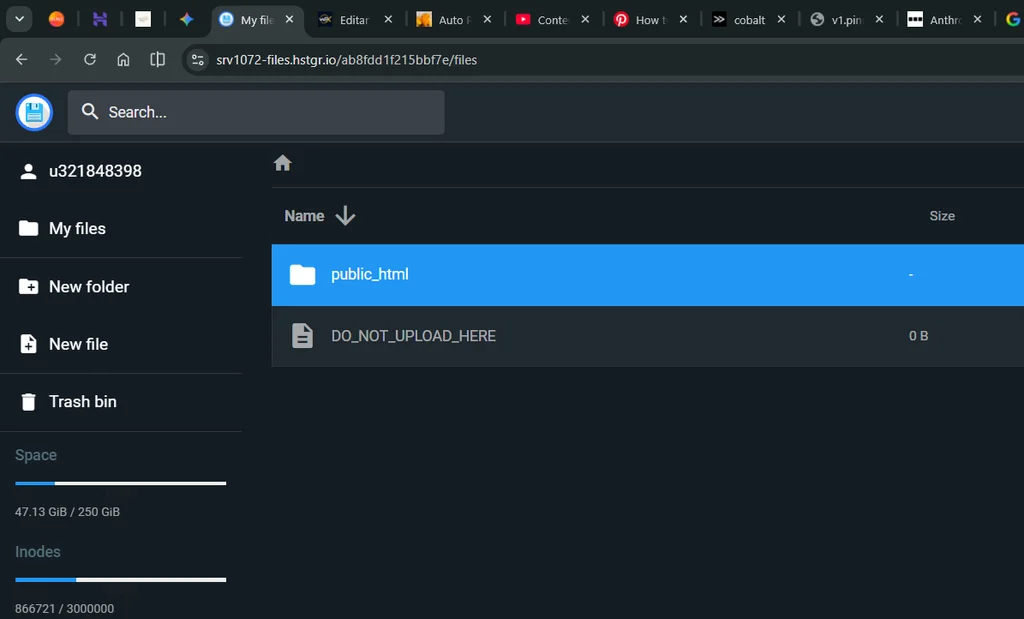
Veja como o deploy foi feito em menos de 3 minutos:
- Compacte o projeto: Reúna os arquivos gerados pelo Gemini 4 Neon (garantindo que a página principal se chame
index.html) dentro de um único arquivo.zip. - Acesse o painel da Hostinger: Entre no seu hPanel, selecione o domínio desejado e abra o Gerenciador de Arquivos (File Manager).
- Vá até a pasta
public_html: É dentro desse diretório que os arquivos públicos do seu site precisam ficar. - Faça o upload do
.zip: Clique no botão de enviar arquivo, selecione o.zipdo seu computador e aguarde alguns segundos. - Extraia os arquivos: Clique com o botão direito sobre o arquivo
.zipenviado, escolha Extrair e confirme que oindex.htmlficou diretamente na raiz da pastapublic_html.
Pronto! Assim que você atualizar o seu domínio no navegador, o site animado criado no Google AI Studio já estará no ar, rápido, seguro com HTTPS e pronto para receber visitantes.
Quer colocar seus projetos de IA no ar hoje mesmo? Conheça os planos da Hostinger com desconto especial e faça seu deploy em minutos.”
Como começar a usar o Gemini 4 Neon hoje mesmo
A liberação do Gemini 4 Neon já começou em múltiplos canais do ecossistema Google [1.1.1]:
- Google AI Studio e API Gemini: Disponível para desenvolvedores (nível pago da API) e para todos os assinantes Google AI Pro e Ultra experimentarem diretamente no AI Studio [1.1.1].
- Aplicativo Gemini: Assinantes dos planos Google AI Pro e Ultra já podem selecionar o Gemini 4 Neon no menu suspenso de modelos [1.1.1, 1.1.2].
- Google Antigravity e Android Studio: Liberado para fluxos de desenvolvimento avançado, inclusive com suporte a enxames de agentes e orquestração com o Hydrogen [1.1.1, 1.1.5].
- Empresas: Disponível no Gemini para Empresas via API ou seletor de modelos [1.1.1].
Perguntas Frequentes sobre o Gemini 4 Neon (FAQ)
O Gemini 4 Neon é o mesmo que o Gemini 4 Pro?
Na prática, sim no que diz respeito ao posicionamento para assinantes. O Google adotou a nomenclatura de elementos químicos na linha Gemini 4 (Hydrogen, Neon, Argon e Carbon), e o Gemini 4 Neon substitui o Argon e o antigo modelo Pro dentro do aplicativo Gemini para assinantes do plano Google AI Pro [1.1.2].
O Gemini 4 Neon é gratuito?
O acesso direto ao Neon está disponível para assinantes dos planos pagos Google AI Pro e Google AI Ultra (no app Gemini, AI Studio e Antigravity) e no nível pago da API Gemini [1.1.1, 1.1.2]. Para uso gratuito no aplicativo, o Google mantém o Gemini 4 Hydrogen por meio da seleção automática [1.1.2].
Preciso saber programar para criar um site com o Gemini 4 Neon?
Não precisa ser programador sênior. Com a abordagem de Vibe Coding no Google AI Studio, você descreve o que deseja em português claro, revisa o resultado visual e pede ajustes. Ter noções básicas de como funciona um arquivo HTML/CSS ajuda apenas na hora de personalizar detalhes e fazer o upload na hospedagem.
Sites feitos em HTML e CSS pelo Gemini 4 Neon funcionam bem na Hostinger?
Sim, funcionam perfeitamente — e inclusive carregam muito mais rápido do que sites cheios de scripts pesados, pois não dependem de banco de dados. Basta enviar o arquivo .zip pelo Gerenciador de Arquivos da Hostinger na pasta public_html e extrair.
O lançamento do Gemini 4 Neon deixa claro que criar projetos digitais de altíssimo nível visual não é mais exclusividade de grandes agências. Combinando o raciocínio afiado desse novo modelo no Google AI Studio com um deploy descomplicado na Hostinger, qualquer pessoa com um bom prompt consegue tirar ideias do papel em questão de minutos. Agora é a sua vez: pegue o prompt, teste o modelo e coloque o seu próximo projeto no ar!
Referências
- Google Brasil (Blog Oficial): Apresentando o Gemini 4 Neon — Por Koray Kavukcuoglu, SVP da Google DeepMind e Chief AI Architect do Google (19/11/2026) [1.1.1].
- Google DeepMind: Gemini 4 Neon – Model Card Oficial [1.1.4].
- Google Antigravity Blog: Gemini 4 Neon in Google Antigravity [1.1.5].
- Canaltech: Google lança Gemini 4 Neon para substituir Argon; veja o que muda [1.1.2].